Repo review · Tested October 2, 2026
pr-lens: AI draws the diagram, you review the code
pr-lens is a pull request visualization tool for developers reviewing agent-written code. The diagrams offer a starting point; checking the changed files and relationships remains your job.
pr-lens offers pull request visualization for developers reviewing agent-written code, with real file references and a full changed-file list still needed beside the drawing. In the launch discussion, one reader asked whether the diagrams came from actual classes and objects or were AI-generated. Google’s AI model Gemini generated our command-line diagrams, and the coding agent Claude Code generated our diagrams by following pr-lens’s coding-agent instructions; across our 47 documents pr-lens invented no file paths. The larger changes left most changed files undrawn, a rather selective way to introduce the code.
Tested: commit
402dc6600b682da48e7191cb067ab355944947e7on October 2, 2026. Scope: analysis with the command-line tool (CLI) and agent-guided diagram creation on merged public pull requests in TypeScript, Python, Go and Rust. Result: references pointed to real files; larger changes left most changed files undrawn, and repeated CLI runs often selected different files. Verdict: adopt with care for supervised pull request orientation.
Set up pr-lens with your coding agent
Paste this prompt into Claude Code, or another coding agent that can run commands, to install the latest pr-lens skill from GitHub and draw one change as local SVG files. It asks before it adds the skill.
Set up pr-lens (https://github.com/coldteadotai/pr-lens) in this repository so you can draw a code change as a diagram. Go one step at a time.

1. Check `node --version` is 20.11 or newer. Run the latest command-line tool from npm; the package is `@coldtea/pr-lens-cli`:
   npx -y @coldtea/pr-lens-cli@latest --version
   It should print 0.13.0 or newer. Stop if the command fails.
2. Tell me the next step adds the pr-lens skill to this project's skills folder, then wait for my yes. After I agree, run:
   npx skills add coldteadotai/pr-lens --agent claude-code --yes
   For another agent, replace `claude-code` with its name.
3. Load the instructions with `npx -y @coldtea/pr-lens-cli@latest skill`. Then diagram the latest commit in this repository: write the diagram document yourself, run `validate` until it passes, and run `render` to write SVG files.
4. Keep everything local. Do not run `canvas push`: it uploads the diagram to prlens.dev. Do not run `analyze`: it needs a model API key and sends the diff to that provider. Do not install the GitHub App or comment on a pull request unless I ask.
5. Tell me that `render` wrote to `.pr-lens/` and added that folder to .gitignore. Then list every file the commit changed and mark each one as drawn or not drawn in the diagram.
6. Report what you installed or changed, where the SVG files are, and what failed. Do not retry a failure more than once without asking.
pr-lens adds diagrams before source review
The README presents pr-lens as architecture and animated data-flow diagrams for humans reviewing agent-generated pull requests. A pull request diagram offers an introduction to the proposed change before the reviewer reads individual files. A diagram can accompany a pull request description.
The CLI documentation describes a workflow that sends a diff, the lines changed between versions, to Google’s Gemini by default using your own key. The CLI checks the returned document’s structure and renders SVG image files. The agent skill runs inside your coding agent, supplying instructions to read changes and write the diagram document. The open packages use the MIT licence. Adopting the tool means choosing both an AI workflow and a destination for its output.
pr-lens diagrams pointed to real files
Every CLI run in the pull request comparison and every skill session ended with a document that passed pr-lens’s format checks.
Every supplied line range was inside the referenced file; references without ranges were outside that line check. Check whether each diagram element accurately represents the referenced code.
An edge is a drawn relationship between diagram elements. Our narrower relationship check asked whether a source file imported another file, for the TypeScript and Python relationships the checker could resolve. For most of the TypeScript and Python file relationships we could check, one file imported the other. Most drawn relationships remained unchecked. An import does not prove a depicted call happens when the program runs. Inspect the source relationship before relying on an arrow.
Large changes need the full file list
For the small TypeScript change, both the command-line tool and the coding-agent skill referenced every changed source file in every run.
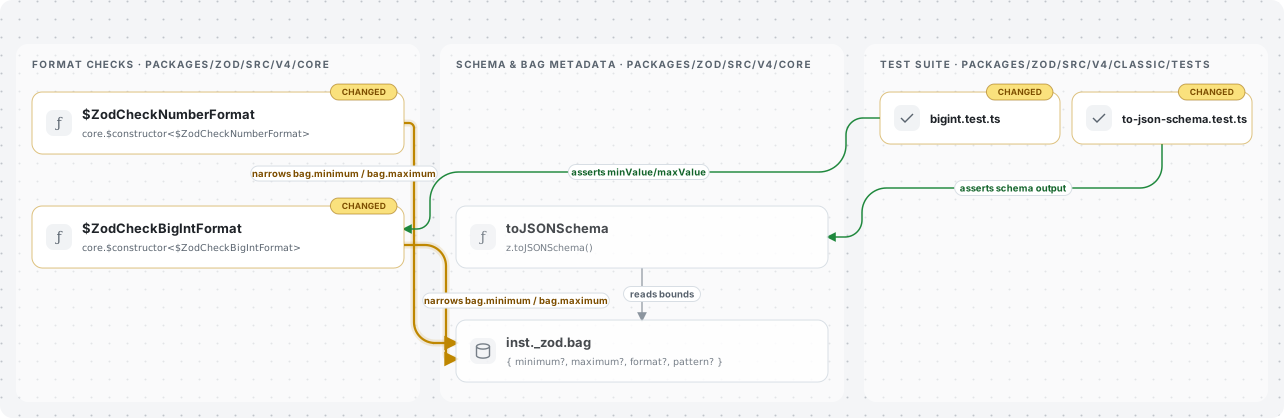
pr-lens’s command-line diagram for the small TypeScript change shows format checks, stored schema information and tests; every changed source file was referenced in this run.
For the large TypeScript change, both workflows left most changed source files undrawn; in its single session on that change, the coding-agent skill referenced only 3 of the 59 changed source files, including tests.
In the Rust file-move case, every drawing referenced Cargo.toml package manifests, files that describe Rust packages; none referenced the changed Rust source files. Compare the diagram with the pull request’s full changed-file list and inspect omitted changes.
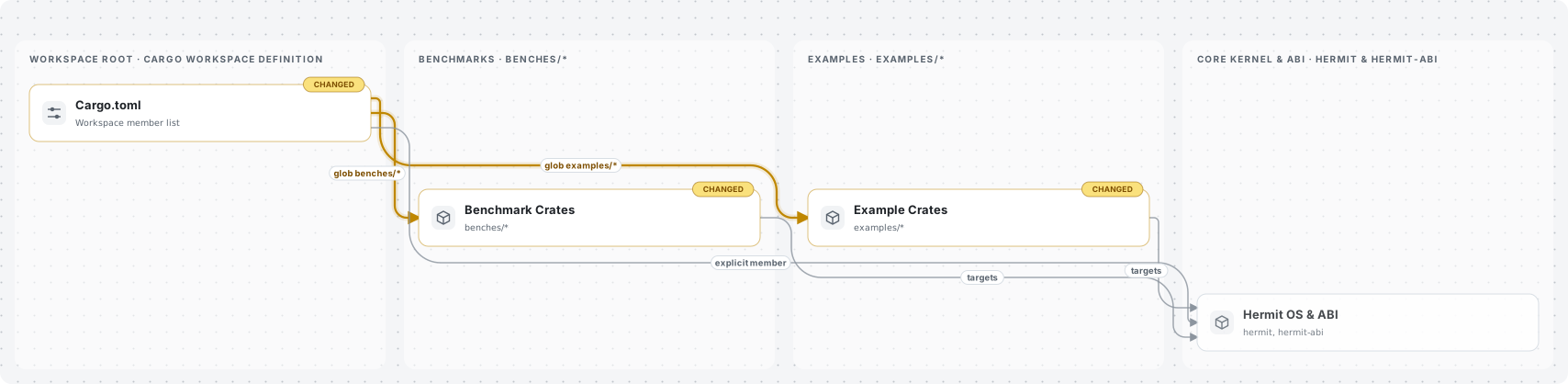
pr-lens’s command-line overview of the Rust file-move change shows Cargo.toml and groups of Rust packages; none of the moved Rust source files appear in the drawing.
Repeated CLI runs also often selected different file sets for the same change. Keep the full file list as the completeness check.
pr-lens’s command-line tool cuts input without marking the diagram
In the oversized CLI case, the diff input was cut at 400,000 bytes. The CLI printed “(truncated)” in the terminal, while the inspected diagram text carried no warning that the input was partial. The complete changed-file list still supplied every filename, so a real filename in the drawing does not establish that the CLI received that file’s full changes.
Check the terminal for “(truncated)” before sharing or relying on the diagram. The analyze command documents --max-diff-bytes for choosing the input limit; a higher value has no tested result here. Consult that option and review the full diff directly. The agent skill uses a different reading workflow, so this input cut belongs to the CLI result.
pr-lens’s agent instructions default to a hosted diagram page
The skill instructions default to a hosted canvas on prlens.dev for diagram-only requests. Claude Code following the pr-lens skill tried to send the drawing there in 12 of 16 skill sessions.
Ask explicitly for SVG files or a pull request comment instead. The skill documents both options; we did not test either delivery path.
Adopt pr-lens with source checks beside the drawing
Adopt pr-lens with care for developers who want initial pull request orientation and will inspect the source. Its real references support that use, while omitted files and changing selections require the full changed-file list beside the drawing. Check terminal truncation warnings and specify where the agent should deliver the result.
For completeness checks, verified calls or approval decisions, use the actual diff and an author’s explanation. For a manually prepared drawing, consider an author-checked Mermaid diagram in pull request Markdown. A release that visibly marks partial input and accounts for omitted changed files would reduce the review work behind this recommendation.