Repo review · Tested August 16, 2026
crawl4ai scrapes web pages into LLM-ready Markdown, menu bars and all
crawl4ai is an open-source Python scraper that renders a page in a real browser and returns it as Markdown for RAG pipelines and agents. The rendering is solid; deciding what to keep is a setting you have to find.

The word doing all the work is “clean”
crawl4ai’s README opens by saying it “turns the web into clean, LLM ready Markdown for RAG, agents, and data pipelines.” Everything a reader needs to decide sits inside that one adjective. Fetching is solved. Rendering JavaScript is solved. Telling the article apart from the menu bars and unrelated page content around it decides whether your search index fills up with cookie banners.
So we pointed it at a Wikipedia article and counted. Before the run we registered fourteen strings as chrome: the navigation, the edit banner, the language switcher, the footer. The default output carried twenty-one occurrences of them.
Then we added one line of configuration, and almost all of it went away.
At a glance
Tested: commit
7e801521428ee12509994d39151006f64055ebe3on August 16, 2026, bothmainand thev0.9.2tag. Setup: 22 seconds to install, then about 1.9 GB of browsers. Workflow: four targets, five runs each, checked against Mozilla Readability over identical HTML. Result: the default output is whole-page; with a content filter attached, all 14 marked chrome blocks disappeared from a ground-truth fixture and all 7 body paragraphs survived. The catch: the self-hosted server answers HTTP 200 andsuccess: truewhile silently discarding a key you misspelled. Verdict: adopt with care for engineers building a retrieval corpus who will set the filter and check that it applied.
Set up crawl4ai with your coding agent
Paste this prompt into Claude Code, or another coding agent that can run commands, to install the latest crawl4ai from PyPI in a virtual environment. It asks before it downloads the browsers.
Set up crawl4ai (https://github.com/unclecode/crawl4ai) on this computer so you can turn web pages into Markdown. Go one step at a time.

1. Create a new virtual environment in ./crawl4ai-env with Python 3.10 or newer, activate it, and install the latest version from PyPI into it:
   pip install -U crawl4ai
   Run `python -c "import crawl4ai; print(crawl4ai.__version__)"`. It should print 0.9.4 or newer. Stop if it prints anything else.
2. Tell me the next step downloads about 1.9 GB of browsers, then wait for my yes. After I agree, run `crawl4ai-setup`, then `crawl4ai-doctor`. If either one asks for sudo or system packages, stop and ask me.
3. Fetch one public page two ways:
   crwl https://en.wikipedia.org/wiki/Web_crawler -o markdown
   crwl https://en.wikipedia.org/wiki/Web_crawler -o md-fit
   `-o markdown` is the whole page, menus and footers included. `-o md-fit` applies a content filter. Show me the word count of each and the first 20 lines of the md-fit output.
4. In Python code, do the same thing: the default `result.markdown` is the whole page, and `result.markdown.fit_markdown` is empty unless a content filter is attached. Use `CrawlerRunConfig(markdown_generator=DefaultMarkdownGenerator(content_filter=PruningContentFilter()))` and read `result.markdown.fit_markdown`.
5. Do not start the Docker server, add an MCP server or set any API key unless I ask.
6. Report what you installed, where, how much disk it uses, and what failed. Do not retry a failure more than once without asking.
What it is and where it fits
crawl4ai is a Python library, plus a self-hostable HTTP server, that drives a real Chromium through Playwright and converts what it renders into Markdown. Its bet is that fetching, rendering, and conversion belong in one component. Every alternative splits those jobs back apart.
Apache-2.0, created in May 2024, with 78,321 stars on August 16, 2026, which is attention rather than correctness. Two signals underneath matter more: one contributor accounts for 1,012 commits, far ahead of anyone else, and eight releases shipped between January and July 2026 with the version still pre-1.0. Among them, 0.9.0 started treating the Docker server’s request body as untrusted input, which sets up the second thing we tested.
The useful workflow: one fetch, two answers
The whole argument turns on one line:
CrawlerRunConfig(markdown_generator=DefaultMarkdownGenerator(
    content_filter=PruningContentFilter()))
PruningContentFilter scores every block on text density, link density, and tag and class names, then drops what falls below a threshold. Attached this way, one arun() call returns both raw_markdown and fit_markdown from the same fetch, so filtered and unfiltered output describe identical bytes. We then ran Mozilla Readability, the extractor behind Firefox’s reader mode, over the exact HTML crawl4ai had returned. Same input, three extractors, no room for a lucky fetch to explain a difference. One target was a fixture whose contents we knew exactly, including two paragraphs that appear only after JavaScript runs.
| Output | body kept | JavaScript-injected kept | chrome kept |
|---|---|---|---|
raw_markdown |
7/7 | 2/2 | 14/14 |
fit_markdown |
7/7 | 2/2 | 0/14 |
| Mozilla Readability | 7/7 | 2/2 | 0/14 |
Both deferred paragraphs came through, which a crawler that did not wait would have dropped without reporting an error.
What worked, and where the shine comes off
Real pages are messier. Wikipedia went from 6,066 words raw, to 4,888 filtered, to 4,044 under Readability; the documentation page went 788, 477, 392. The filter is doing the main job: on Wikipedia it eliminated 13 of the 14 marker types, leaving a single “Jump to content.”
But fit_markdown is not an article extractor. The extra 844 words are the revision-history banner and maintenance categories, strings like “Articles with unsourced statements from April 2023”: text-dense and link-heavy, exactly what that scoring keeps. Readability is built to find one article; the pruning filter is built to find signal. Neither is objectively correct here. crawl4ai ships LLM-backed and BM25 filters for the same job; this review covers the heuristic path only.
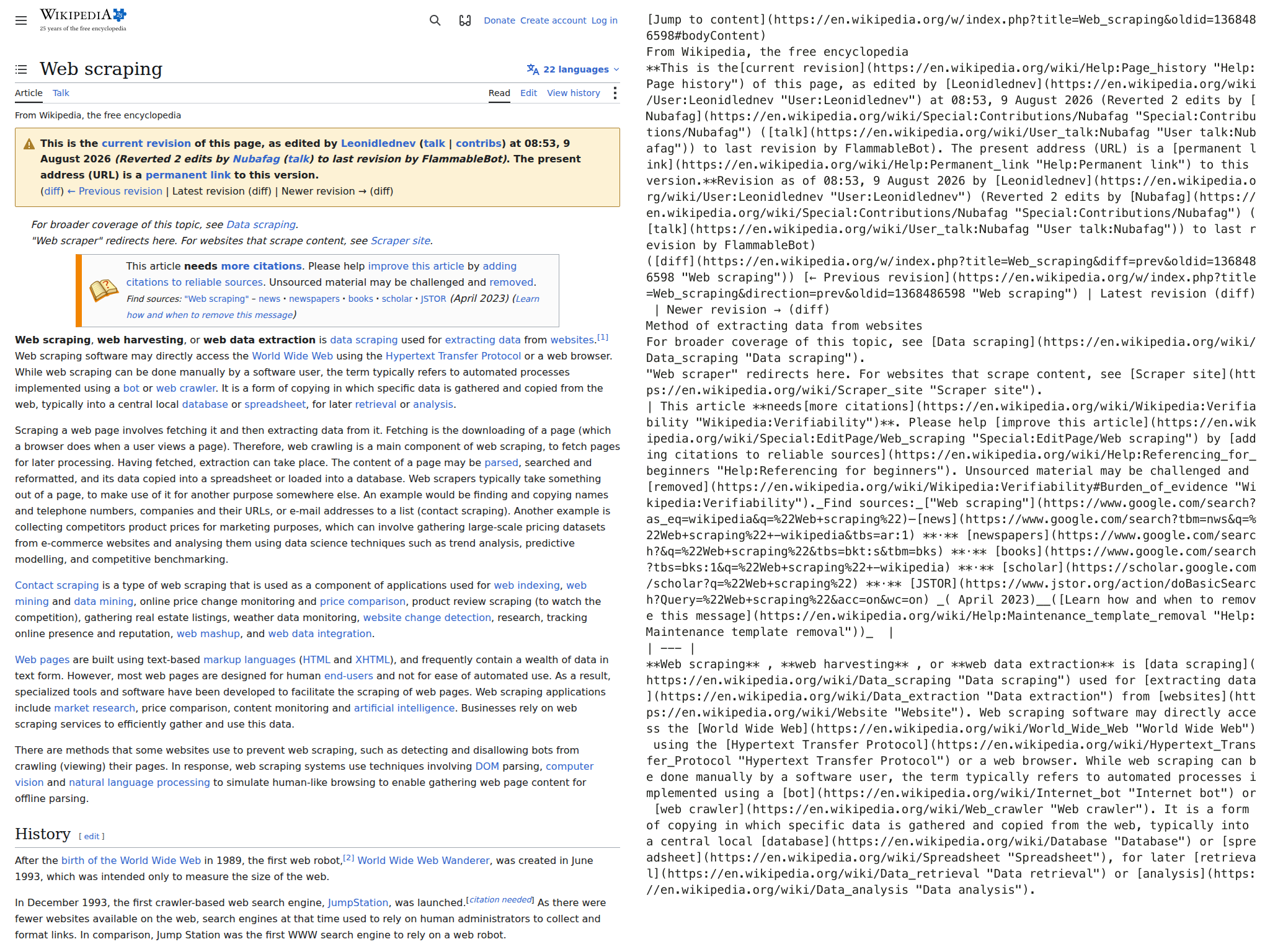
Left: a Wikipedia article as it appears in a browser. Right: the same page after crawl4ai converted it to Markdown, the plain text a language model reads, with the content filter turned on. The article text comes through intact, and so do the revision banner, the diff links, the citations box, and a “Jump to content” left behind by the menu. Page content from Wikipedia, CC BY-SA 4.0.
The stability result is the dull one. Across twenty runs, extracted length did not vary by a single word, and pages came back between 2.1 and 2.7 seconds with standard deviation at or below 0.20. Scoped narrowly on purpose: one VM, four cooperative URLs, no concurrency, and a Wikipedia revision frozen by oldid. We did not test a single origin that fights back.
The sharper problem is in the self-hosted server. We built the image from the pinned Dockerfile and sent it deliberately broken configurations. First we checked the instrument: a correct css_selector cut the response down to a single heading, so the server does apply settings it recognises. Then we sent that same setting under crawler_run_config, the key name used before 0.9, and got the entire page back. Misspelling the key inside an otherwise correct crawler_config did the same thing. Both come back HTTP 200 with success: true.
A crawl that fails tells you it failed. A crawl that ignores your configuration and reports success quietly produces the wrong corpus until somebody checks. And the boundary is not uniformly silent: send a forbidden field like js_code and you get an immediate 400. The server is loud about what protects the server and quiet about what protects you.
One genuine defect surfaced. HTTPCrawlerConfig is how you ask for the cheap non-browser fetch path, the thing you would reach for on pages that do not need Chromium at all. Supply it as browser_config and the server returns HTTP 500 with nothing but an opaque error and a correlation id. Reproduced in-process, it is AttributeError: 'HTTPCrawlerConfig' object has no attribute 'items' inside async_configs.py. The cause sits in the library, and the caller cannot see it from the response.
Use it when, skip it when
Use it when the pages genuinely require a browser and you would rather own one component than three, or when you are building a retrieval corpus and will set a content filter by default. The ownership cost is real: 96 packages into an 832 MB virtualenv, about 1.9 GB of browsers, and a 9.23 GB image. LiteLLM, a multi-provider LLM client, installs whether or not you touch a language model.
Skip it when your target content already arrives in server-rendered HTML, where a plain request plus a readability pass costs almost nothing and skips Chromium entirely. Skip it when the job is defeating bot protection: we tested three cooperative hosts and nothing adversarial, and the library is proxy-less by design. Skip it when the extra twenty percent matters, and run a dedicated extractor after it rather than instead of it.
Good at the hard part, careless with the defaults
Adopt crawl4ai with care when you need web pages turned into text a language model can read. It drives a real browser, so pages that assemble themselves with JavaScript arrive complete, and with a content filter turned on it cleared every navigation and footer block out of a test page we controlled, and all but one marker out of a real Wikipedia article.
Leave the defaults and you get the whole page, menus included. The self-hosted server answers success: true while quietly ignoring a setting you misspelled. Set a filter, and check the text you get back rather than the status code.
Skip it if your pages arrive as finished HTML; a plain request and a readability library are cheaper. It is pre-1.0 and the config format already moved once, so pin what you test. Until unknown keys are rejected instead of dropped, it will happily clip you a perfect article with one strip of the navigation still attached.