Repo review · Tested August 7, 2026
crawlseo: the self-hosted SEO tool for people who own the plumbing
crawlseo puts Search Console data and a site crawl in one self-hosted dashboard. The convenience is real; so are the operator chores.

Search Console tells you what Google noticed. A crawler tells you what your site shipped. Small teams often keep those facts in separate tabs, leaving the useful comparison as a recurring manual chore.
crawlseo puts both jobs in one self-hosted SEO workbench: connect Google Search Console, crawl a site, and inspect the overlap in one report. The project README also lists vitals, opportunities, exports, and MCP access. We focused on the account-connected crawl flow because that is where the two halves become a product.
The tool still expects its operator to be the adult in the utility room.
Tested: commit
f83a60ade5cf71be3806bc28e70b4638e54df20din a disposable Linux VM on August 7, 2026. Workflow: Google authorization, one selected Search Console property, normal same-origin crawl, report, then visible GSC refresh. Result: 13 pages crawled; health 91/100; content average 98/100; one critical issue and one orphan in the rendered report. Verdict: adopt with care for technical operators running a small site or portfolio.
Set up crawlseo with your coding agent
Paste this prompt into Claude Code, or another coding agent that can run commands, to start the latest crawlseo from GitHub with Docker Compose. You add the Google credentials and sign in yourself, and it asks before it starts the containers.
Set up crawlseo (https://github.com/crawlseo/crawlseo) on this computer with Docker, so I can see Search Console data and a site crawl in one dashboard. Go one step at a time.

1. Check `docker --version` and `docker compose version`. If Docker is missing, stop and ask me; do not install it yourself. Then get the latest code:
   git clone https://github.com/crawlseo/crawlseo.git && cd crawlseo && cp .env.example .env
2. In .env, replace the APP_SECRET and NEXTAUTH_SECRET placeholders with two new values from `openssl rand -hex 32`. Do not print them.
3. Stop and wait for me. I will create a Google OAuth web client with the redirect URI http://localhost:3000/api/auth/callback/google, enable the Google Search Console API, and put GOOGLE_CLIENT_ID and GOOGLE_CLIENT_SECRET into .env myself. Never ask for, read back or print those values.
4. Tell me the next step starts a PostgreSQL container and the app, and that the app's port 3000 is published on every network interface. Wait for my yes. After I agree, run:
   docker compose pull && docker compose up -d
   Run `docker compose ps` and `curl -s http://localhost:3000/api/health`. Both containers should be running and the health check should answer. Stop otherwise and show me the last lines of `docker compose logs`.
5. Tell me to open http://localhost:3000, sign in with Google, add one site I own and run a crawl. I do the sign-in; you do not.
6. Report what you created or changed and what failed. Do not retry a failure more than once without asking.
A self-hosted SEO tool with private data inside
The phrase “self hosted SEO tools” describes a small search category with a large implied chore list. crawlseo is not a browser bookmarklet that gives a stranger’s URL a score. Its normal setup needs PostgreSQL, a Google OAuth web client, the Search Console API enabled in that Google project, and a Google identity with access to the property you want to inspect.
This is the price of bringing private search-performance data into an application you operate. crawlseo’s own database holds the selected site, its synced Search Console records, and its crawl records. The advantage is that an operator can review search data and technical data together without handing both to a hosted SEO suite.
The alternatives are often simpler. Use Search Console directly when search performance is the whole job. Use a specialist crawler or hosted suite when you need scale, JavaScript rendering, scheduled scans, support, or a documented service level. If the job is broader keyword and competitive research rather than your own site’s crawl, open-seo is the wider self-hosted workbench, with a metered data provider attached. crawlseo fits between those poles: a compact, inspectable workspace for a technical team that wants to own the stack.
Search Console met the crawler
The account-connected path is the point of the product, so we did not stop at installation or seeded records. In the authenticated application, the property list loaded, the chosen site was created, the normal crawl request started, and the later visible Search Console refresh completed. The sanitized app log records HTTP 201 for site creation, 202 for crawl start, and 200 for the later refresh.
The crawl report rendered with a health score, crawl count, issue count, content score, orphan count, and page table.
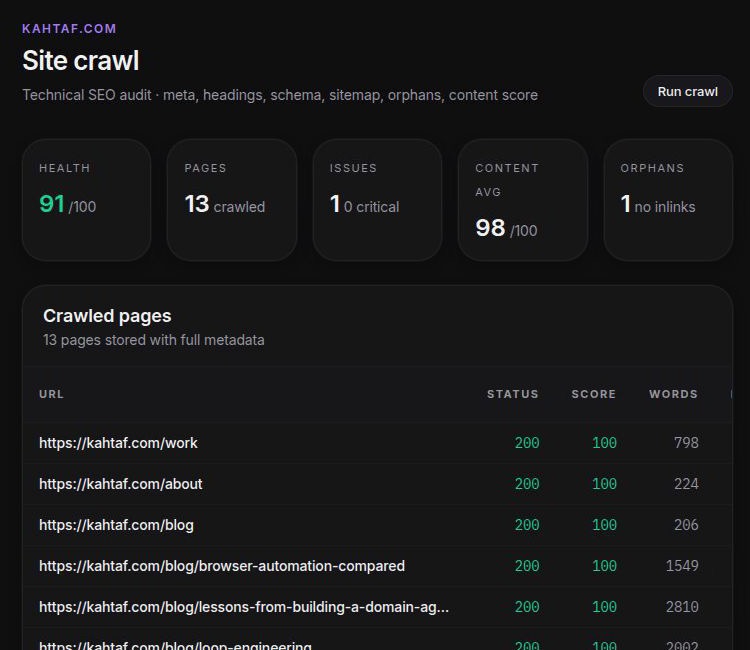
The completed report from the selected property.
The workflow went from private Google authorization to a report an operator could use, without a database workaround or direct API-only crawl. The separate GSC refresh also completed after the crawl. “It crawled” and “it can update the search-data side” are different claims; this run established both for the selected property.
The missing knob on the crawl button
There is an operational wrinkle. crawlseo’s route accepts an optional page limit, but the visible Run crawl control did not offer one in this revision. It used the application’s 200-page default. We explicitly approved that normal UI default for this small public same-origin site; the crawl stopped after 13 pages and remained inside the five-minute run limit.
The default was fine for this run. It is not ideal product ergonomics. A technical operator should be able to choose the page budget before pressing a button that makes network requests on their behalf, especially as a site gets larger or stranger. Until that control is visible, set scope deliberately outside the UI or treat the default as part of the ownership cost.
The report also recorded one critical HTTP 404 at a /cdn-cgi/l/email-protection path. Cloudflare documents that path as a managed email-obfuscation endpoint. We did not establish that crawlseo is wrong about every such URL, but we did establish that this critical alert needs inspection before anyone starts “fixing” it. A dashboard cannot tell you whether a wrench belongs on the table or in the wall.
Who should own this stack
crawlseo fits if you already run PostgreSQL, control a site or small portfolio, and want your Search Console view next to a practical technical crawl. It also makes sense when you value self-hosting enough to own a Google OAuth client and review the underlying findings.
Choose something else if you need a public instant checker, a hard crawl budget in the usual button flow, JS-rendered or very large-site auditing, vendor support, or unattended remediation. We did not test PageSpeed, DataForSEO, alerts, exports, external MCP clients, scheduling, or long-running operation, so none gets promoted from README feature to verified capability here.
Useful reports still need an operator
Adopt crawlseo with care. It is a credible self-hosted SEO workbench for technical founders and small teams. Its defining path worked: real authorization, one selected property, a normal crawl, a readable report, and a separate sync.
It also asks you to own PostgreSQL, OAuth, crawl scope, and interpretation. The report is useful; the operator still has to decide whether a critical endpoint is a broken link or Cloudflare doing its little stage trick behind the curtain.
Add a visible page budget and better context for managed URLs, then this moves closer to an easy recommendation. Until then, try it where the person reading the report can also open the link.