Idempotency: handling the same request twice
Why apps receive duplicate requests, how idempotency keys stop the damage, one way to build them, and how to have your coding agent audit your project.
- Published
- Author
- Kahtaf Alam

Paste this into your coding agent, in your project. It shows you the risks and waits for your OK before changing anything.
Audit this codebase for idempotency issues. Find every operation that changes state or has side effects, including endpoints, webhooks and background jobs, and work out what a retry or duplicate would do, including two arriving at once.
Show me the findings ranked by severity and wait for my OK before changing anything.
Then fix them, worst first, and prove each fix with a real duplicate request. Use test data only, never production data. Tell me what you couldn't check.An operation is idempotent if running it twice has the same effect as running it once. Your app needs this wherever a repeat would do damage, such as a second email, a duplicate record or a double charge.
This page introduces the pattern and links to deeper guides. The prompt above has your coding agent look for the places your own project is missing it.
TL;DR
- Networks, clients, webhook senders and job queues all retry, so your server will receive duplicates.
- The usual fix is a unique key for each action, which the sender reuses on every retry.
- The server records the key before doing the work, and a repeat gets the first result back.
- Have your agent audit every write path, then check its fixes against the table below.
The problem: retries are normal
A client that times out can’t tell whether its request failed or only the response did, so it tries again. Without protection, the server does the work twice.
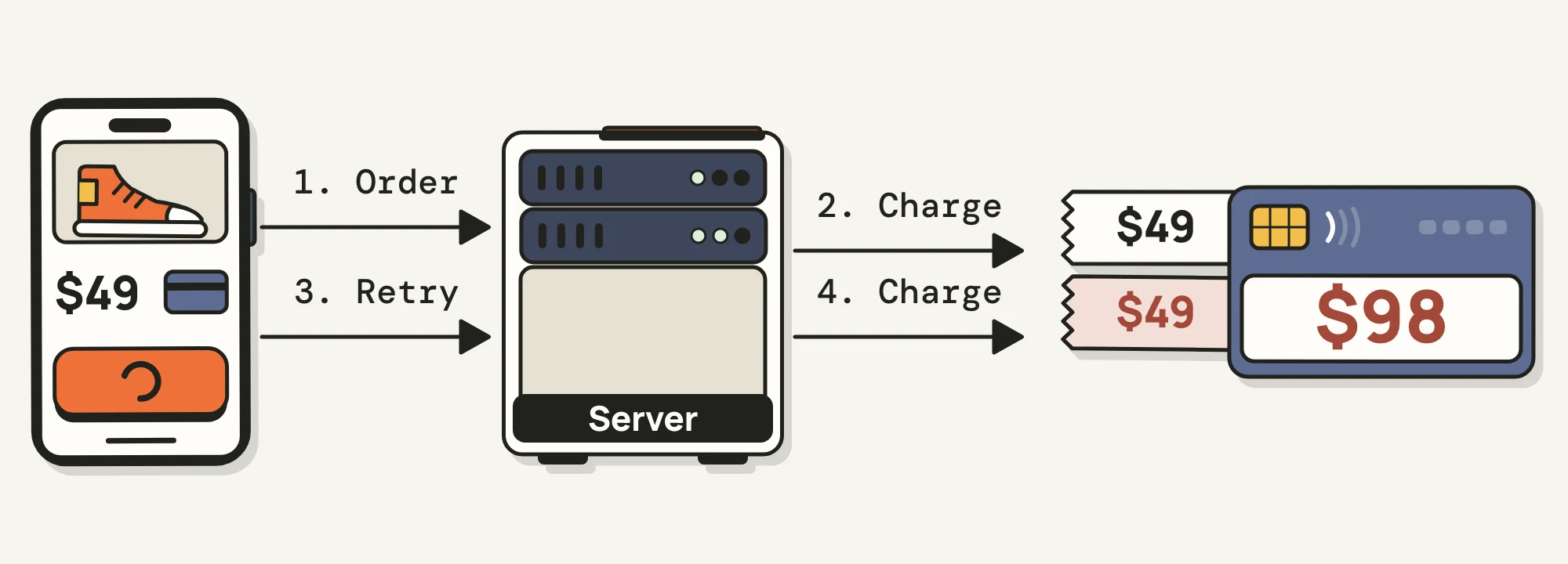
Without a key, the retry is charged as a new order.
Payments are the expensive example, but this happens in any app:
| What repeated | Why | What happened |
|---|---|---|
| A chat message | The API returned errors for messages that had gone through | Discord clients retried, and users saw duplicates |
| A weekly email | A background job failed partway and retried the whole batch | LaunchNotes sent subscribers the email again |
| A new account’s setup | A webhook handler replied too slowly, so the sender retried | One founder’s app created a second workspace |
Double clicks and repeated form submissions cause the same problem. HTTP defines GET, PUT and DELETE as idempotent, though your handlers can still break that. POST carries no such promise, so POST handlers are where an audit usually finds work.
How idempotency keys work
- The caller generates a unique key for the action and sends it with the request.
- The server claims the key, does the work and saves the result against the key.
- A repeat with the same key gets the saved result back, and the work doesn’t run again.
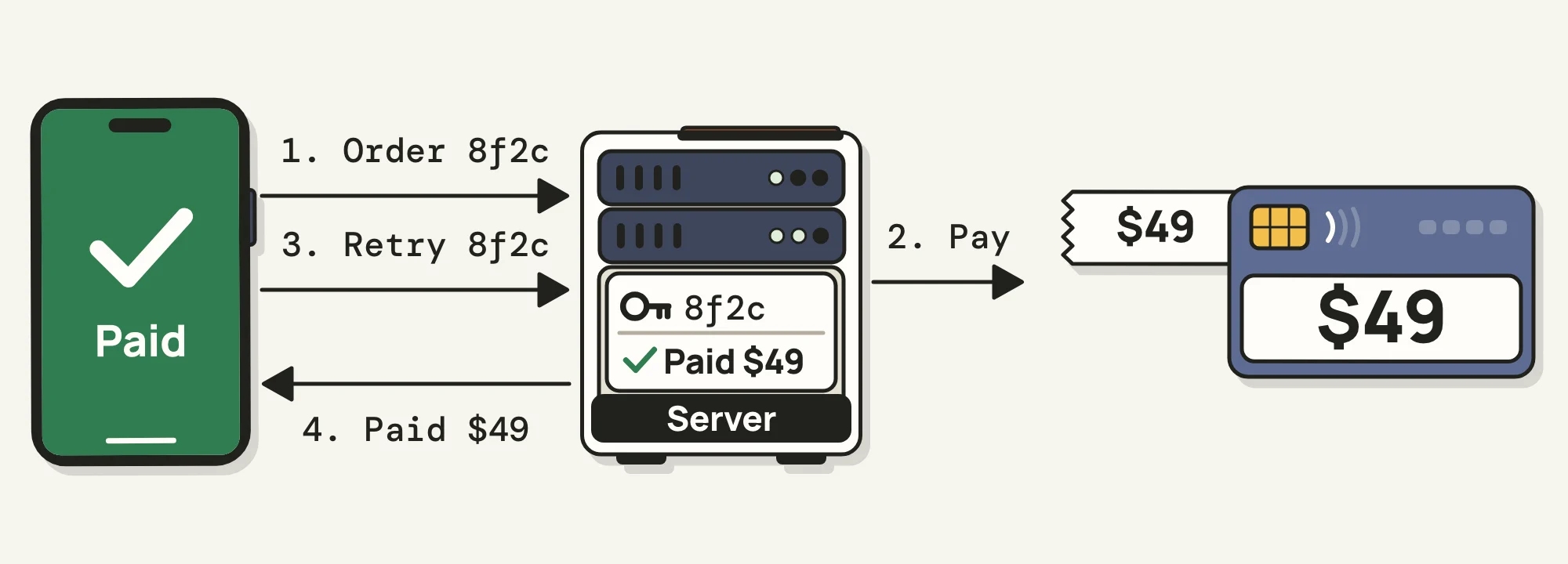
With a key, the retry gets the saved result back.
The caller creates the key once per action, because a new key on each retry looks like a new action. Webhooks usually carry a key in the sender’s event ID, and a background job can use a business ID such as the invoice ID.
One possible implementation
Your database, framework and requirements will change the details, and sometimes you don’t need a key at all, because a unique email column already stops a duplicate signup. Here’s a sketch for a Postgres app, where each key belongs to a user:
// The primary key is (user_id, key),
// so only one insert can win.
const claim = await db.query(
  `INSERT INTO idempotency_keys (user_id, key)
   VALUES ($1, $2)
   ON CONFLICT (user_id, key) DO NOTHING`,
  [userId, key],
);

if (claim.rowCount === 0) {
  // A repeat. Return the saved result,
  // or a 409 if the first is still running.
  return replaySavedResult(res, userId, key);
}

const result = await doTheWork(req.body);
await saveResult(userId, key, result);
return res.status(201).json(result);
The insert comes first because checking for a key and then saving it leaves a gap, where two requests can both find nothing and both do the work. A unique constraint lets the database pick one winner.
A real version has more to decide, such as how long keys live, what happens to a key when the server crashes mid-request, and whether a failed attempt should run again. Brandur Leach’s article works through these.
Have your agent audit your project
Finding every place that needs this means reading handlers, jobs and webhook code across the project. Your agent can do that reading with the prompt above.
A useful audit returns rows like these, in this invented example:
| Operation | On a duplicate | Severity | Status |
|---|---|---|---|
POST /projects |
Creates a second project | High | Not protected |
| Signup webhook | Creates a second account | High | Not protected |
POST /invite |
Sends a second email | Low | Not protected |
PUT /profile |
Same result | None | Already safe |
What to check in the agent’s fix
| If you see | It fails because |
|---|---|
| A check for the key, then a save | Two overlapping requests both pass the check |
| A new key on each attempt | Every retry looks like a new action |
| Keys that aren’t tied to a user | One user could get another’s response |
| Keys held in memory | They’re lost on restart and not shared between servers |
| A disabled button as the only fix | Network, webhook and job retries still get through |
Ask your agent to write a test like this one for each fix, adding your app’s sign-in. One request should succeed, and the other should get a 409 or the same response. Then check your test data to confirm that the work happened once.
key=$(uuidgen)
for i in 1 2; do
  curl -s -o /dev/null -w "%{http_code}\n" \
    -X POST localhost:3000/orders \
    -H "Idempotency-Key: $key" \
    -H "Content-Type: application/json" \
    -d '{"total": 49}' &
done
wait
The audit only reads what’s in the repo. Retry settings in a load balancer or a queue’s dashboard may not be there, so ask the agent what it couldn’t see.
Further reading
The best places to go next, easiest first:
- Idempotency: what it is and how to implement it, Alex Hyett. The plainest explanation we found, with a short video.
- Designing robust and predictable APIs with idempotency, Stripe. Covers what a failed request leaves you unsure of, and how far apart to space retries.
- Prevent double form submissions, OpenReplay. Start here if your duplicates come from people clicking twice.
- Idempotency and deduplication, Svix. Useful if your app receives webhooks. The sales pitch stays at the end.
- Implementing Stripe-like idempotency keys in Postgres, Brandur Leach. The full design for a request that crashes halfway, so read this one last.