Leaked secrets: handling API keys in your code
What an API key is, how keys leak to the internet and to your coding agent, what to do first when one does, and how to have your agent audit your project.
- Published
- Author
- Kahtaf Alam

Paste this into your coding agent, in your project. It shows you the risks and waits for your OK before changing anything.
Audit this codebase for exposed secrets, in the code, the full git history, logs and error responses, and anything sent to the browser. Show me what you find ranked by severity, masking the values, and list the keys I need to cancel and replace myself, including any live key you read during this audit. Wait for my OK before changing anything. Then fix the rest, worst first. Show me how you checked that none remain, and tell me what you couldn't check.An API key is a password your app uses to call a paid service, so anyone who gets it can spend your money or read your data.
This page covers how keys leak and what to do when one does. The prompt above has your coding agent look for exposed keys in your project.
Before you paste it, swap live keys in your .env for test keys where you can, because the agent reads every value it audits. If a provider has no test keys, use a limited key with a spending cap and replace it afterwards.
TL;DR
- Keys leak through git history, browser code, logs and your coding agent.
- Cancel an exposed key at the provider first. Deleting it from your code doesn’t stop it working.
- A
.envfile doesn’t protect a value that your build sends to the browser. - Give your agent test keys, then have it audit the project and check its fixes against the table below.
What a leaked key costs
These are real-life examples of what can go wrong if an API key leaks, as the builders themselves reported them:
| Who | What happened | Damage |
|---|---|---|
| A small team on Reddit | A Google Cloud key was stolen, and they don’t know how | $82,314 in 48 hours, against a normal $180 a month |
| An app developer on Reddit | A public Firebase key was used to call Gemini | About $55,000, which Google later adjusted |
| A developer on Hacker News | A Gemini key was hard-coded while vibe coding | About $300 |
| An OpenAI user on Reddit | A key ended up on Pastebin | A bot used up the spending limit in minutes |
A spending limit can cap the damage. Check that yours is a real cap, because some budgets only send alerts.
Where keys leak
| Where it ends up | How it gets there |
|---|---|
| Git history | Committed once, deleted later |
| Browser | A public prefix, a build setting, or a server value passed to code that also runs in the browser |
| Logs and error responses | Logging or returning a whole error object |
| Chat and tickets | Pasted while debugging or setting up a tool |
| Your coding agent | Read from a file, or printed by a command it ran |
Your agent can see your keys too
A coding agent reads files and runs commands to do its job, and what it reads is usually sent to its model provider. Claude Code, for example, also keeps session transcripts on your disk in plaintext for 30 days by default. Asking your agent to find your keys means it will read them.
Blocking .env only goes so far:
| Tool | What its docs say |
|---|---|
| Claude Code | Deny rules don’t cover a script that opens the file itself. Its sandbox still lets commands read most of your computer by default |
| Cursor | Its ignore file can’t stop the agent’s terminal or connected tools |
| GitHub Copilot | Its file exclusions don’t apply in Agent mode |
An agent you deploy inside your app can also be talked into giving a key away. METR, an AI research group, says an attacker found one of its vibe-coded apps with its sign-in broken, asked the app’s agent for its API key, and used about $600,000 worth of free credits over three weeks. Simon Willison’s article explains when a tricked agent can leak data.
To limit what your agent can leak:
- Give it test keys, and keep live keys in your host’s settings rather than on your machine.
- Use keys with limited permissions and a spending cap, so a leak costs less.
- Replace any live key an agent did read, which is the safe answer.
What to do first
To revoke a key is to cancel it at the provider so that it stops working. GitHub’s guide puts this first.
- Revoke the old key, even if your app breaks for a few minutes.
- Create a new key and put it in your host’s environment settings or a secret manager, not back in the repo.
- Check the provider’s logs for use you don’t recognize.
- Rewrite git history only for a specific reason, such as customer data in a commit. GitHub calls it time-intensive and often unnecessary once the key is revoked.
Which keys are meant to be public
Scanners and agents can both flag keys that are safe to ship, so check the provider’s docs first. Here are some examples, and this isn’t an exhaustive list:
| Provider | Safe in the browser | Never in the browser |
|---|---|---|
| Stripe | pk_ publishable keys |
sk_ secret and rk_ restricted keys |
| Supabase | sb_publishable_ and the legacy anon key |
sb_secret_ and the legacy service_role key |
| Maps and Firebase keys, if limited to those services | Any key that can call Gemini |
A public key can still expose data. A Supabase key is meant to be public, but with no access rules on the database it can let anyone read your data. The prompt on this page doesn’t cover that, so ask your agent to check those rules separately.
How keys reach the browser
The name of an environment variable can decide what a framework ships. Next.js copies NEXT_PUBLIC_ values into the JavaScript it sends to the browser, and Vite does the same for VITE_ values.
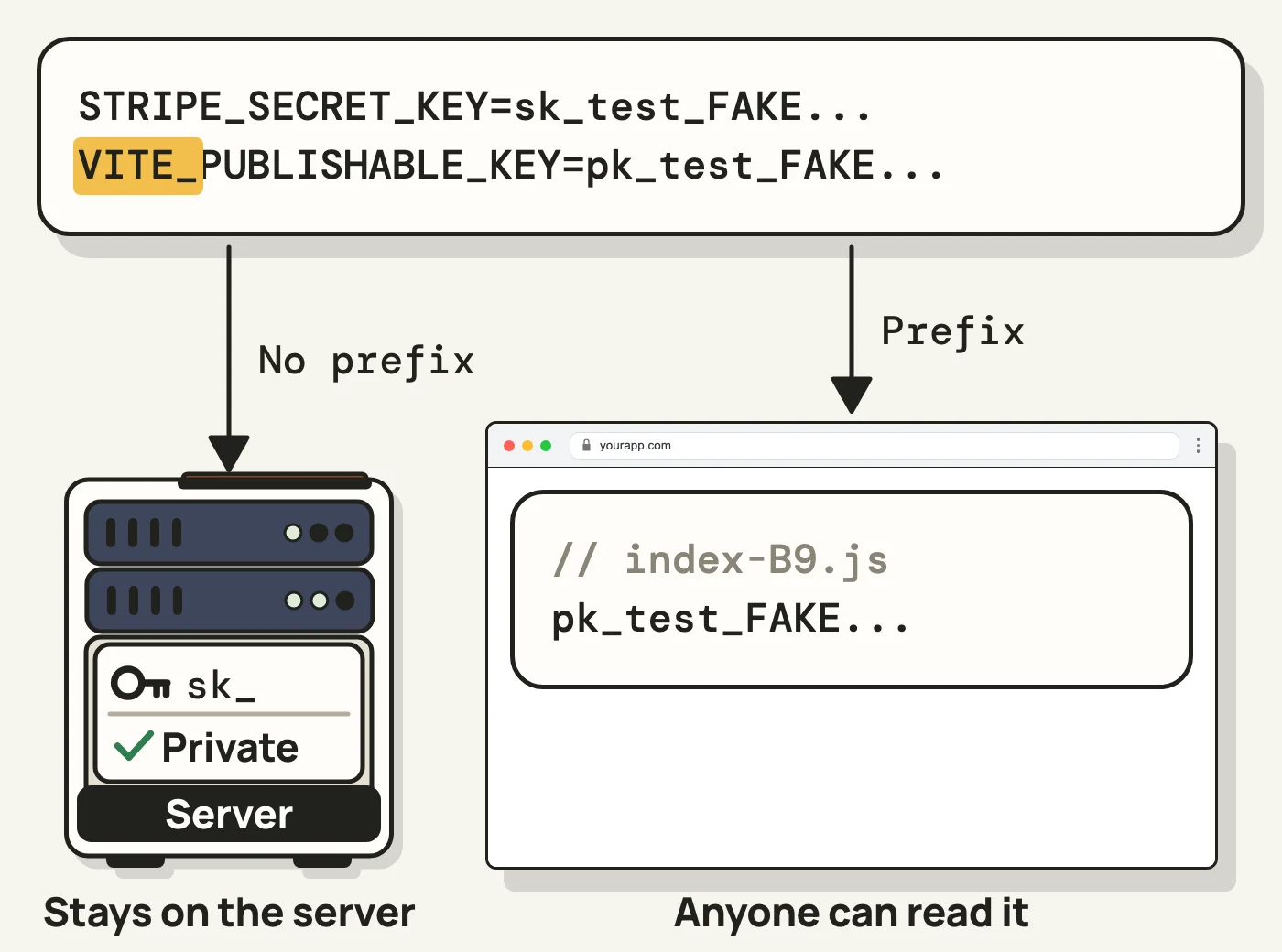
The variable’s name decides where the value goes.
Ignoring a .env file keeps it out of git. Once a build copies a value out of the file, that protection no longer applies. The usual fix is a server route that holds the key, which the browser calls.
Why deleting a key isn’t enough
Here’s an example. You commit a key in a .env file, then delete the file in a later commit. The file is gone from your project, and the key is still in the history:
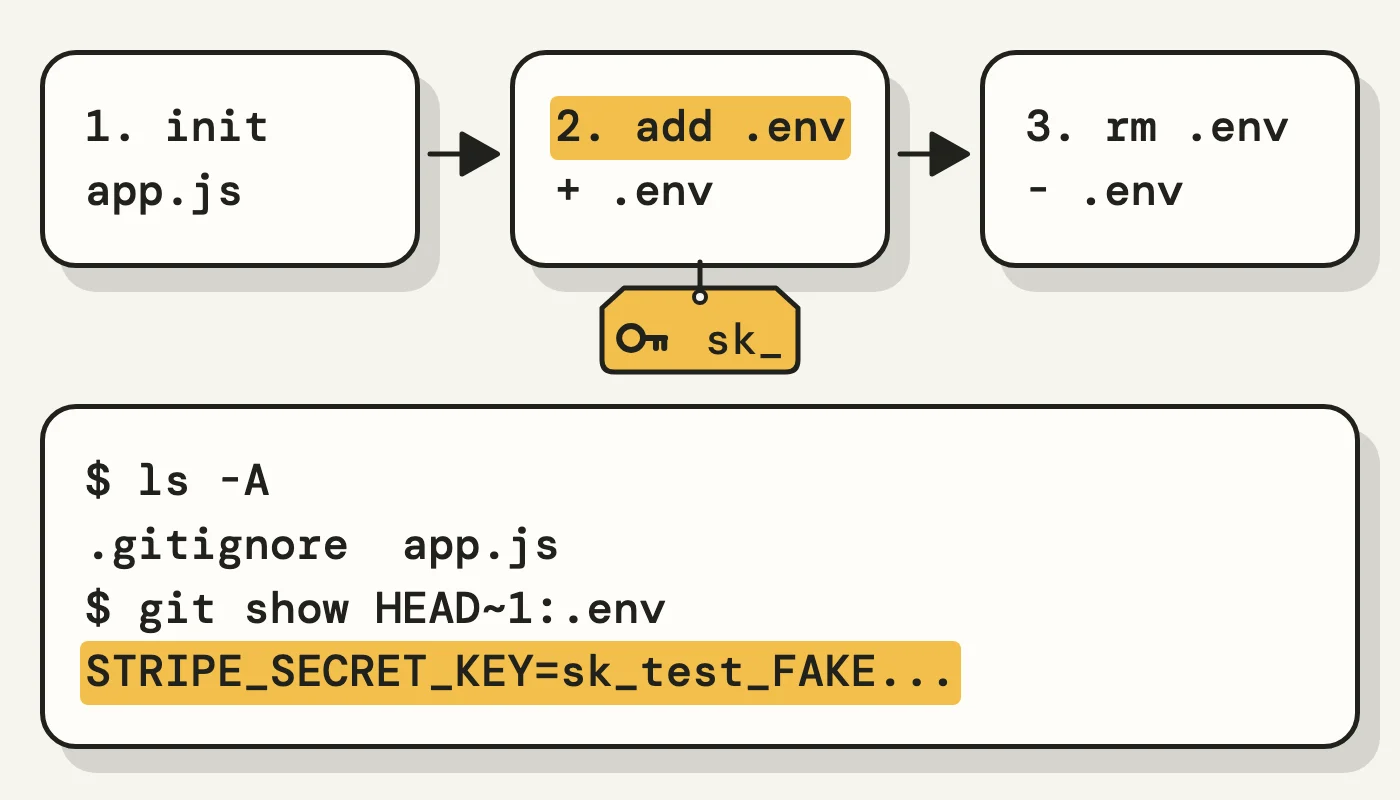
The key stays in the commit that added it.
A scanner such as gitleaks can check your current files or the full history, so make sure a scan covers the history:
# The files you have now
gitleaks dir --redact .
# Every commit
gitleaks git --redact .
A clean scan doesn’t prove a project is clean, because scanners can miss plain-word passwords and keys split across strings.
Have your agent audit your project
An agent can read the git history, run your build, search the output and read your error handlers with the prompt above. The prompt asks for masked values, but the agent still reads them. A useful audit returns rows like these, in this invented example:
| Finding | Where | Severity | Who acts |
|---|---|---|---|
| Payment secret key | Old commit, .env |
Critical | You revoke it. The agent reads the new one from the environment |
| Database secret key | NEXT_PUBLIC_ variable |
Critical | You revoke it. The agent adds a server route |
| AI provider key | Logged by an error handler | High | You revoke it. The agent fixes the logging |
| Payment publishable key | Client code | None | Nobody, it’s meant to be public |
What to check in the agent’s fix
| If you see | It fails because |
|---|---|
| The key removed, with no list of keys to revoke | The key still works |
| History rewritten and the problem called solved | The key still works, and old copies survive |
.env added to .gitignore as the whole fix |
Git keeps tracking a file it already tracks |
| A secret in a public prefix or passed to browser code | The value ships to every visitor |
console.error(err) in a request path |
Error objects can carry request headers |
| A clean scan as the only proof | Scanners miss things, so it also needs a build search and a read of the code |
An audit won’t see your host settings or provider logs. Do the revoking yourself, and check your provider’s dashboard to confirm that each old key is cancelled.
Further reading
The best places to go next, easiest first:
- How to stop your AI app from leaking API keys, Vishal Chauhan on DEV. Seven beginner steps, from checking your app to capping spend.
- I scanned 978 vibe-coded apps, Sandeep Roy on DEV. A builder finds his own key in his bundle after a clean repo scan. The numbers are his own, and he promotes his tool.
- How to protect secrets when coding agents deploy your app, Flavio Copes. Where secrets escape when an agent builds and deploys.
- Google users fight for refunds, The Register. Named builders’ billing disputes, and what it took to get money back.
- The lethal trifecta for AI agents, Simon Willison. Three conditions you can check to see when a tricked agent can steal data.
- Google API keys weren’t secrets, Truffle Security. How a public Maps key could become a Gemini billing key.
- Best practices for managing secret API keys, Stripe. A clear split between exposure and compromise, plus limited keys.