agent-browser operates web pages from the terminal
agent-browser is a command-line browser automation tool for coding agents. It describes page controls as text, and it installs as one native program plus a single Chrome download.
- Verdict
- Verdict: Try
- Tested
- Commit
4720bc3- Author
- Kahtaf Alam

A coding agent can build a form and still miss that its Save button writes to the neighboring record. agent-browser supplies browser automation for an agent that can run shell commands.
Tested: commit
4720bc3dd73f2c8f7c84f415adfa560330b924c4on November 13, 2026, on Linux. Workflow: Claude Code, Anthropic’s coding agent, checked four versions of an inventory app’s forms through agent-browser, Playwright MCP and Playwright CLI. Result: Claude Code caught every saving and validation bug with each tool. Twice, an agent-browser lookup by button name got another row’s Save button, and Claude Code canceled. Verdict: try it, and have the agent click by snapshot reference (the ID each control gets).
Set up agent-browser
Paste this into your agent:
Install the latest agent-browser CLI and its browser from https://github.com/vercel-labs/agent-browser.
Add its skill with `npx skills add https://github.com/vercel-labs/agent-browser --skill agent-browser`, then load the core guide with `agent-browser skills get core`.
Open my web app and check a form submission, including validation and saving after reload.
Click by snapshot reference and read each confirmation before accepting it.
Snapshots give each control a reference
agent-browser keeps Chrome running between commands. A snapshot describes the page as text and gives each control a short reference, which the agent passes to click and fill commands. Vercel Labs maintains the Apache-2.0 project with regular pre-1.0 releases. The agent-browser skill on skills.sh (instructions an agent loads on demand) showed 1.5M installs on November 14, 2026. It tells the agent to load the CLI’s core guide, which teaches this snapshot-and-reference loop.
The test inventory has a dozen rows, each with a Save button. In this snapshot -i excerpt, each hint names the button’s row, so @e51 clicks Alder’s:
- cell "Alder" [ref=e11]
- cell "2" [ref=e12]
  - spinbutton "Alder quantity" [ref=e50]: 2
- cell "Save" [ref=e13]
  - button "Save" [ref=e51] hint="in:Alder"
- cell "Birch" [ref=e14]
- cell "3" [ref=e15]
  - spinbutton "Birch quantity" [ref=e52]: 3
- cell "Save" [ref=e16]
  - button "Save" [ref=e53] hint="in:Birch"
Interactive mode (-i) focuses on controls, and compact mode (-c) keeps a shortened outline of the page. One user’s agent spent extra turns looking for page text in interactive mode, so use a full snapshot or read the page’s text when checking status and error messages.
Clicks by name can hit the wrong button
Claude Code used agent-browser to catch all three bugs we built into an inventory app: a save that wrote into the next record, invalid input with no error message, and new records that vanished after reload.
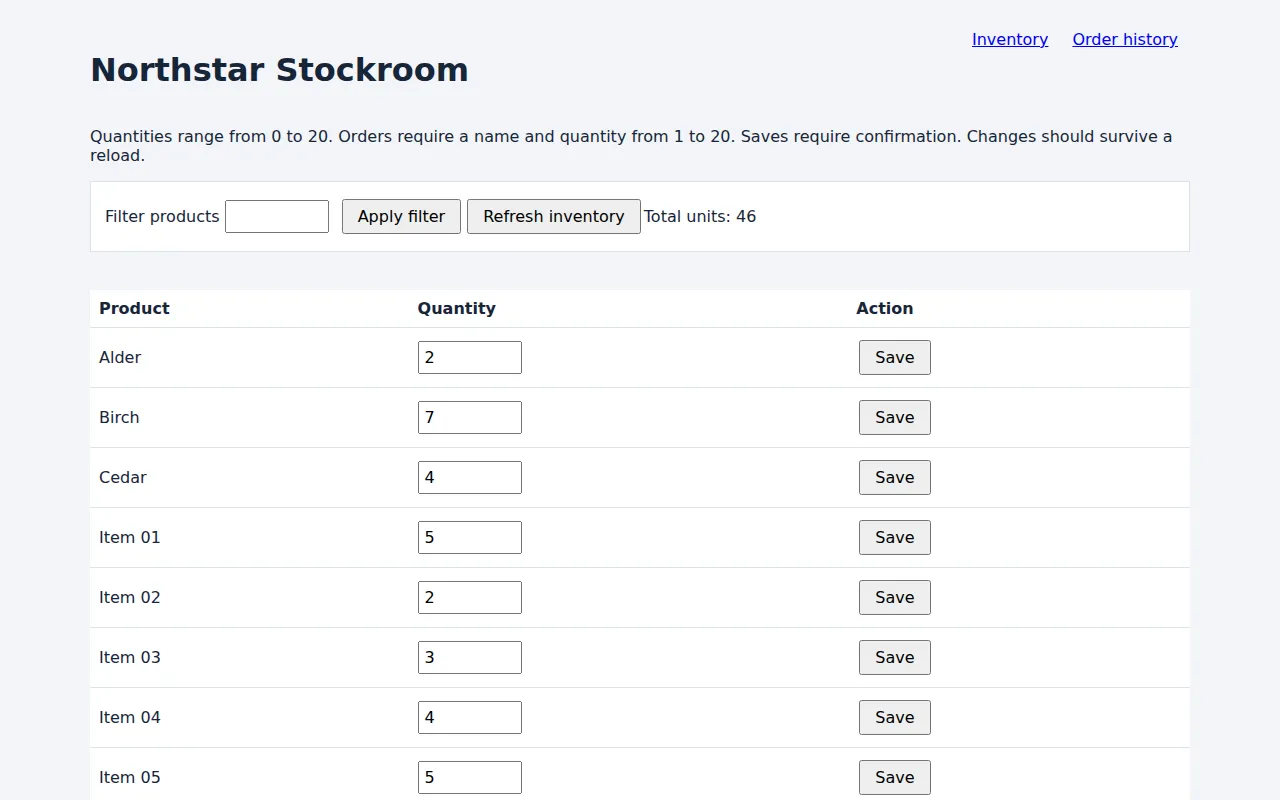
Alder was set to 7 and saved. After a reload through agent-browser, Alder still shows 2 and Birch shows 7: the app’s built-in bug wrote the value to the next record.
Twice, Claude Code asked for a button named Save instead of using a reference. agent-browser clicked the Save button in another row, Item 09, and printed “Done”:
$ agent-browser find role button click --name Save
✓ Done
$ agent-browser dialog status
⚠ JavaScript confirm dialog is open: "Save changes to Item 09?"
  Default prompt text: ""
  Use `dialog accept [text]` or `dialog dismiss` to resolve it
Both times the cause was the page-wide lookup by name; the snapshot mode played no part. Claude Code canceled at the confirmation. Its Playwright sessions clicked by reference or by a row-scoped name, never by that page-wide lookup. Users report the same “Done” when fill on a dropdown typed into the previously focused field and when clicks missed on a smooth-scrolling page. Have the agent click by reference, use select or check for dropdowns and checkboxes, wait for scrolling to stop, and reload to check saved values.
Playwright used fewer text tokens
Playwright MCP gives agents browser tools through MCP (Model Context Protocol). Pulumi and a developer reported agent-browser using fewer tokens than Playwright MCP; Playwright MCP’s lower text count here comes with more screenshots.
| Claude Code browser interface | Bugs found, of 3 | Text tokens, mean per app version | Screenshots, mean per app version |
|---|---|---|---|
| agent-browser, interactive snapshots | 3 | 17,689 | 0.25 |
| agent-browser, compact snapshots | 3 | 17,736 | 0.25 |
| Playwright MCP | 3 | 13,026 | 2.25 |
| Playwright CLI with skills | 3 | 16,722 | 0.5 |
agent-browser installs lighter than full Playwright
A full Playwright install adds the test library and its default browsers: Chrome for Testing, a second Chrome build for headless runs, Firefox and WebKit, plus FFmpeg for video. agent-browser is a single native program, and agent-browser install downloads one Chrome for Testing build.
| Install on Linux | Commands | npm packages, unpacked | Browser downloads |
|---|---|---|---|
| agent-browser | npm install -g agent-browser, agent-browser install |
21 MB | 203 MB |
| Full Playwright | npm install -D @playwright/test, npx playwright install |
19 MB | 570 MB |
| Playwright, Chromium only | same npm step, npx playwright install chromium |
19 MB | 342 MB |
Playwright CLI and Playwright MCP use the same packages. Adding --no-shell to the Chromium-only install drops the download to about 210 MB, close to agent-browser.
Good enough to try
Try agent-browser if you want an agent-friendly tool for browser checks and automation that installs lighter than a full Playwright setup. It found the same bugs as Playwright in our test. One catch: a control picked by name can be the wrong look-alike while the tool still reports “Done”, so have the agent click by reference and confirm what it saved. If Playwright MCP already works for you, keep it.