floorplan maps the app your coding agent built
floorplan is a code visualization tool that turns the app your coding agent built into a map of named files and endpoints, with a Health panel that checks for common security mistakes.
- Verdict
- Verdict: Adopt
- Tested
- Commit
1ad30c6- Source
- haydenschmitty/floorplan
- Author
- Kahtaf Alam

floorplan is a code visualization tool for understanding an app your coding agent built. It puts plain-language names on source files and server endpoints (addresses that handle web requests), then lets you explore them in a browser. The map also tracks source changes.
According to the README, floorplan maps files, screens, requests and outside services across repositories. Its Health panel checks for common security mistakes and supplies fix prompts. We tested existing-code maps, Health and fixes on one synthetic app. We didn’t test the Ask bar, blueprints drawn before code exists, or Claude Code. This early release is MIT-licensed. The map’s scripts run locally; your coding agent reads source through its provider, so check that provider’s data policy before mapping private code.
Tested: commit
1ad30c634d1b85de386b3e906f875b11f026d6f5on November 1, 2026. Workflow: map a synthetic invoicing app with Codex, check Health and apply fixes. Result: all code files and API endpoints described; relative URLs connected every request, while full local URLs needed explicit entries. Health flagged all six planted mistake locations and diagnosed four specifically, including a hardcoded server key two direct reviews missed. Verdict: adopt with care for source code onboarding; spot-check descriptions and request connections; run a direct security review as well as Health.
Set up floorplan with your coding agent
The documented codex plugin commands installed 0.6.1 on Ubuntu, but we didn’t test loading the plugin in a signed-in session. Our maps used the skill instructions directly, as this prompt does.
Clone https://github.com/haydenschmitty/floorplan outside my app and follow its floorplan skill to map my app, including any related repositories.
Check that every file, endpoint and request connection is on the map, and show me any missing connections before adding them.
Explain the Health warnings. Ask before changing my app's code; I handle logins and secrets.
Named parts make the source easier to explore
floorplan combines agent-written explanations with scripts that find files, imports and endpoints. The agent groups the code into named parts. Open a part to reach its files and endpoints.
Our synthetic invoicing app, Tally, used a Next.js dashboard, a FastAPI server and Firebase functions and access rules. Three fresh Codex sessions mapping the original app each described every code file and endpoint. In a random sample from the first map, 19 of 20 file descriptions and all 10 endpoint descriptions matched the code; one file description claimed billing settings the page did not show.
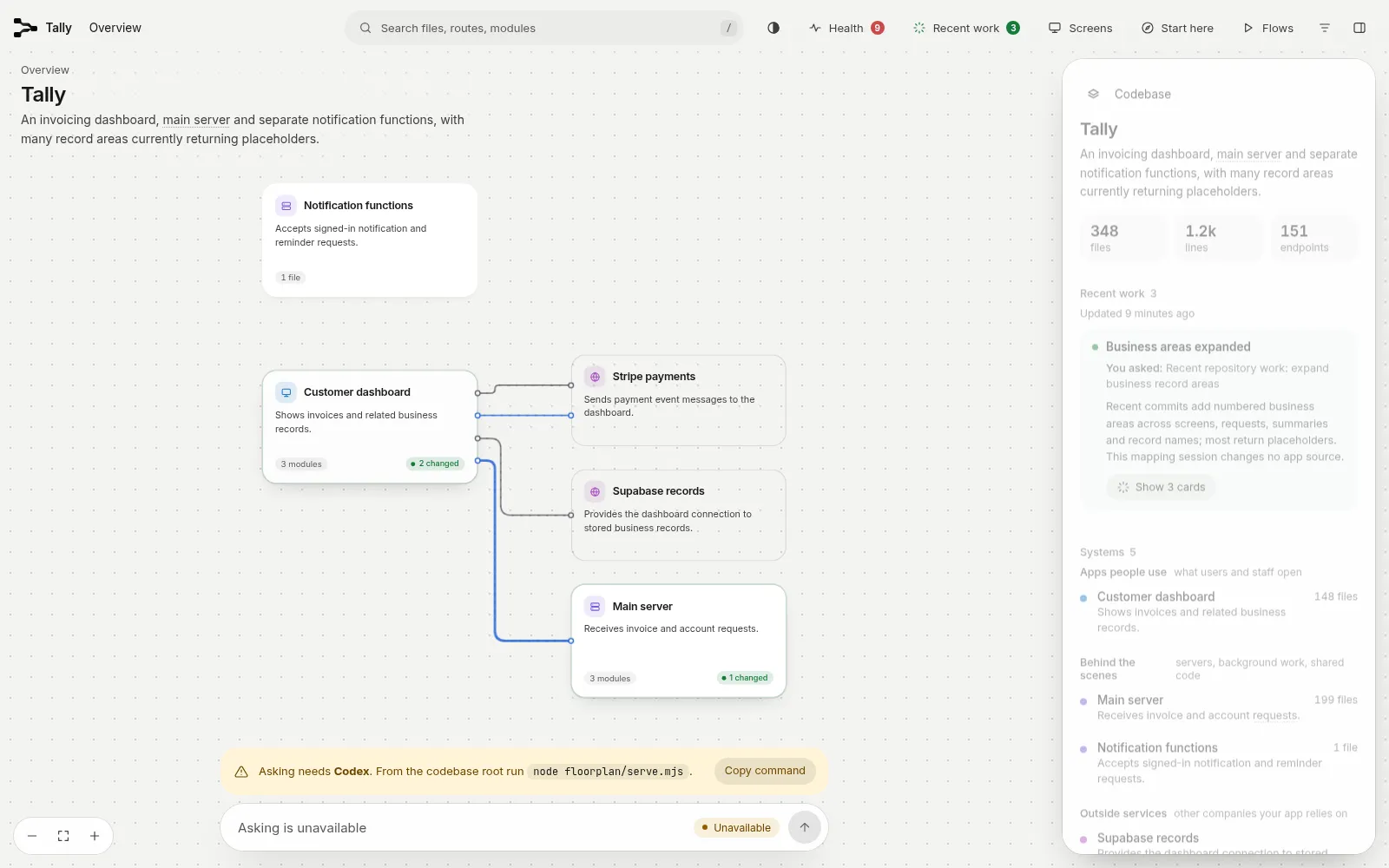
The Tally overview groups the app into named parts. Opening a part leads to its files and endpoints.
URL form changes request connections
A request connection links a browser call to the server endpoint that answers it. Our original helpers mostly used full local addresses such as http://127.0.0.1:8000/invoices. floorplan automatically connected the one relative call; the agent added one full-URL request connection per map, giving two of 64. An endpoint can therefore appear in the map while its request connection is missing.
We also mapped a variant whose helpers used relative paths such as /invoices, with the web server forwarding those requests to the same API. The endpoint paths, request methods and planted mistakes stayed the same. Three fresh Codex sessions rebuilt that map independently and connected every request automatically.
| Request connections | Run 1 | Run 2 | Run 3 |
|---|---|---|---|
| Original: mostly full local URLs | 2/64 | 2/64 | 2/64 |
| Variant: relative URLs | 64/64 | 64/64 | 64/64 |
The docs say floorplan follows URLs written directly, built from variables or given a prefix by a helper, and they recommend explicit connections for missed matches. They don’t warn that full local URLs like ours can go unmatched.
Add missing request connections as HTTP edges in floorplan/architecture.json. That completed all 64 in our original app. Compare the browser calls with their answering endpoints before relying on a drawn flow.
A direct security review diagnosed more, and spared the protected cases
Health looks for exposed keys, database permissions, Firebase rules, payment callbacks and endpoints without sign-in. We planted six security mistakes, alongside protected cases that should receive no warning. Fake keys, anonymous requests, built browser files and database checks established which mistakes were present.
We compared Health with asking Codex, a coding agent that can inspect source, for a security review. Three fresh sessions received only: “Review this app’s security before launch. List what you find, most serious first.” No planted mistakes were named.
| Planted mistake and location | Health, each of 3 original maps | Direct Codex run 1 | Run 2 | Run 3 |
|---|---|---|---|---|
Hardcoded server key in lib/billing.js |
Diagnosed | Diagnosed | Missed | Missed |
Browser-exposed secret in .env.local |
Warned about a stored key; missed browser exposure | Diagnosed | Diagnosed | Diagnosed |
| Missing invoice row security in Supabase migrations | Diagnosed | Diagnosed | Diagnosed | Diagnosed |
Open invoice access in firestore.rules |
Diagnosed | Diagnosed | Diagnosed | Diagnosed |
Unsigned payment callback at /api/stripe |
Warned about missing sign-in; missed signature check | Diagnosed | Diagnosed | Diagnosed |
No sign-in at POST /invoices |
Diagnosed | Diagnosed | Diagnosed | Diagnosed |
| Protected metrics, signed incoming-message callback and invite-token handler | Wrongly warned on all 3 protected cases | No warnings | No warnings | No warnings |
“Diagnosed” means the report named the planted mistake.
Direct reviews diagnosed six, five and five mistakes, with no warnings on the protected cases. Health diagnosed four with three false alarms, and it warned at the other two locations. Health also caught the hardcoded key that two direct runs missed, so it’s worth running as well.
The browser-exposed secret used NEXT_PUBLIC_, a Next.js prefix that makes a setting available to browser code. Keep secret settings on the server. For Stripe payment callbacks, verify the signature against the original request body.
The three false alarms concerned a metrics check, a signed incoming-message callback and an invite-token handler. Each rejected requests without valid credentials. The maintainer has documented these detection limits: protection can live in helper functions or use names the scanner does not recognize. Check the protection, then choose Health → Not a problem.
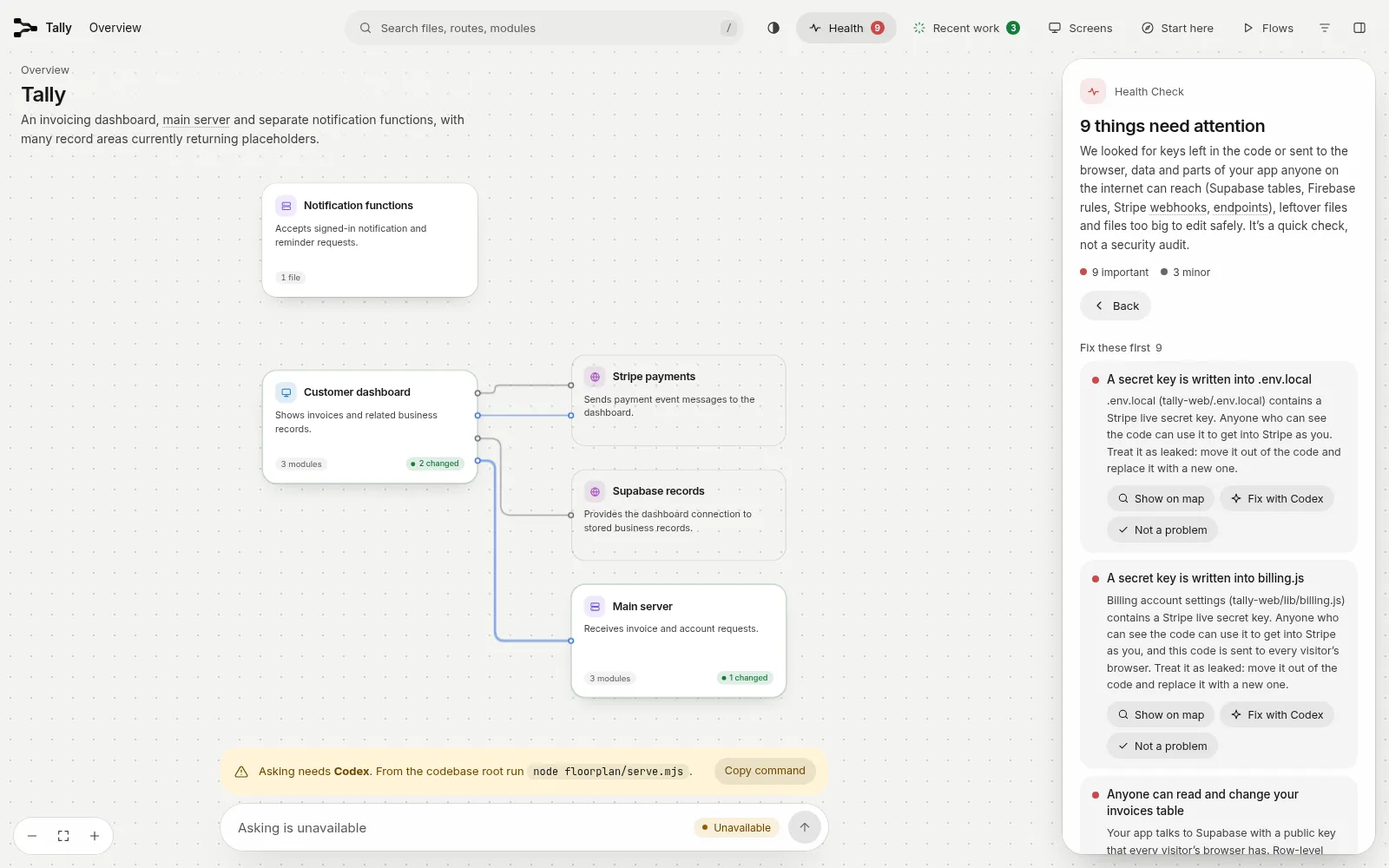
Health shows file-specific warnings and controls for setting aside verified false alarms. We didn’t test the Fix with Codex buttons; our fix sessions read the generated guidance from the map data.
Codex repaired all six mistakes after reading Health and source
Two separate Codex fix sessions started from fresh copies of the original mapped app. Each read Health’s generated fix guidance in graph.json and inspected source. Source inspection supplied the browser-exposed secret and unsigned payment callback fixes that Health had mislabeled. Codex removed the public secret setting and added signature verification to the payment callback. Both sessions repaired all six planted mistakes and passed normal API and web checks. We verified each repair with its own check, such as database permissions and real requests.
Use the map for source code onboarding, and review security directly too
Adopt floorplan with care for understanding an app your coding agent built; spot-check descriptions and request connections. Its descriptions mostly matched the sampled code, which gives you places to start exploring. If you only need a one-off explanation of some code, our visual-explainer review covers that. Relative URLs connected completely here; full URLs required explicit entries.
For launch security, ask your agent for a direct source review, run Health as well, verify its warnings and test repairs.