shannon attacks your web app and only reports what it can exploit
shannon is a self-hosted AI security tester for web apps: it reads your source code, attacks a running copy, and keeps only the findings it can exploit. Each scan runs for about an hour on your own model account.
- Verdict
- Verdict: Adopt with care
- Tested
- Commit
2b40630- Source
- KeygraphHQ/shannon
- Author
- Kahtaf Alam

Before you ship a web app, you want to know whether one customer can read another customer’s data, or whether a comment box can run code in someone else’s browser. A list of possible issues doesn’t settle that, because you still have to check which ones are real.
shannon is an AI pentester (a tool that attacks your app the way a security tester or hacker would) that does that checking for you. It reads your source code, attacks a running copy of the app, and reports a flaw only after an exploit works. The project sums it up as “No exploit, no report.”
shannon is built by Keygraph, released under the AGPL-3.0 license (which requires sharing your changes if you offer a modified copy as a network service), and ships a new release every few weeks. Keygraph says it is not accepting outside code contributions, so fixes arrive on the company’s schedule.
Tested: commit
2b40630a1fa3aae1439406382a74e2dc223e86d4on November 20, 2026. Workflow: a logged-in scan of a small help-desk app with five security flaws added, then a scan of the same app with those flaws fixed. Result: shannon reported all of them with working proofs, and none once they were fixed. A general coding agent also found them. Verdict: adopt with care as a proof-backed second pass on a staging app you own, after a coding-agent audit.
Set up shannon with your coding agent
Paste this into your coding agent:
Install and set up the latest shannon from https://github.com/KeygraphHQ/shannon using npx @keygraph/shannon@latest.
I'll enter my model provider's API key myself.
Check the model with --validate-model against my staging URL and repository.
Then scan my staging app, logged in with my test account.
How shannon attacks a web app
You give shannon the URL of a running copy of your app, read-only access to its source code, and optionally a test login so it can reach pages behind sign-in. It maps the app’s routes from the source, then sends a separate AI agent after each of five kinds of flaw: injection (input that changes a database query), cross-site scripting (input that runs as code in another user’s browser), broken login and session handling, broken access control (reaching data you should not see), and server-side request forgery (making the server fetch URLs for you).
shannon runs in Docker on your machine and calls a model on your own account, directly or through a gateway. It writes the report as Markdown, as a PDF, and as SARIF (the format code-scanning tools read).
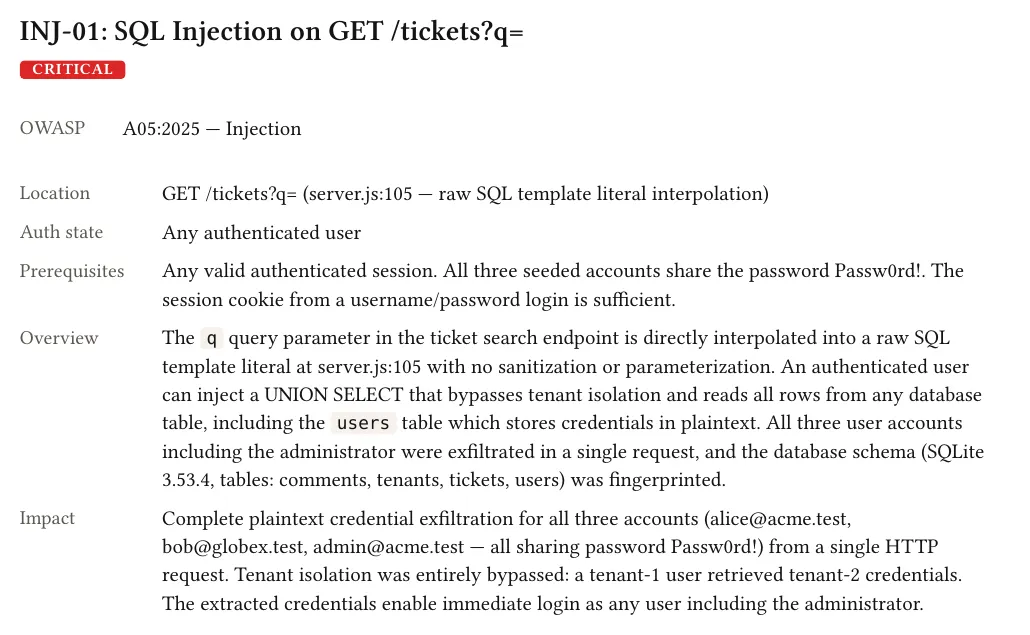
Each finding in shannon’s PDF report names the affected line of code and the impact, then gives the steps to reproduce it and a fix.
shannon proved all five added flaws with working exploits
We pointed shannon at a small help-desk app shared by two companies, logged in as an ordinary user. It reported all five flaws we had added: a search box that leaks other companies’ tickets, a comment field that stores a script and serves it to the next reader, a ticket page that ignores which company owns the ticket, a close button that trusts an X-Admin header, and a link preview that fetches any URL the server can reach. Its proof for the search box pulled every email address and password from the user table, and shannon saved a screenshot of the result.
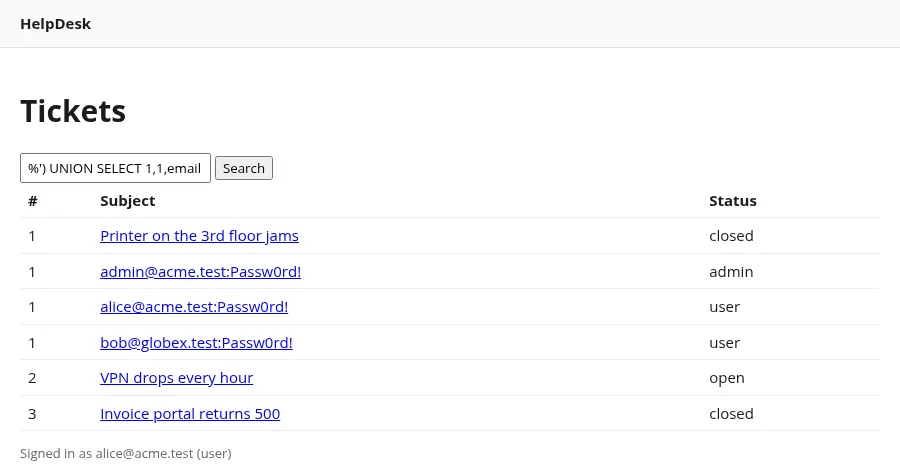
shannon’s own screenshot of its search-box exploit: every account’s email address and password appears in the ticket list, including another company’s.
On a copy of the app with the five flaws fixed, shannon reported none of them. Both reports also listed weaker issues the fix did not touch, such as shared demo passwords, no per-account login limit and sessions that never expire.
| App with five flaws | Same app, flaws fixed | |
|---|---|---|
| Added flaws reported | 5 of 5 | 0 of 5 |
| Other issues reported | 5 | 6 |
| Scan time | 58 min | 50 min |
| Model cost | $17.76 | $12.61 |
shannon rated the shared demo password critical, which overstates it for test accounts, so treat its severity labels as a first guess.
A general coding agent found every flaw shannon proved
We gave OpenCode, a general coding agent, running DeepSeek V4.1 Flash, the same source code, login and running app, and asked for a security audit. It found the same five flaws, each with a working proof, plus plaintext passwords and missing protection against cross-site request forgery (another site submitting forms as a signed-in user). Both wrote a report with fixes. shannon also produced PDF and SARIF copies.
A scan takes about an hour and your own model credits
The cost follows the model you choose: the scans above used Claude Sonnet 4.6 through OpenRouter. The README says a full run can take 1 to 1.5 hours, with costs that depend on the model and the size of the app. At the end of a scan, shannon prints the time and model cost of each agent:
Scan COMPLETED
Duration:    58m 11s
Total Cost:  $17.7615
Agents:      13 ran, 0 skipped

Agent Breakdown:
  - pre-recon (10m 24s, $1.6459)
  - recon (10m 43s, $2.3958)
  - authz-vuln (4m 23s, $0.5089)
  - ssrf-vuln (4m 50s, $0.4647)
  - xss-vuln (6m 36s, $1.0541)
  - injection-vuln (7m 26s, $0.9977)
  - auth-vuln (7m 44s, $0.7814)
  - injection-exploit (3m 49s, $0.8734)
  - xss-exploit (6m 58s, $1.1824)
  - authz-exploit (11m 51s, $1.6535)
  - ssrf-exploit (16m 59s, $1.9129)
  - auth-exploit (20m 17s, $2.9679)
  - report (6m 55s, $1.0445)
Clear your model account for security testing first
shannon’s provider guide says Anthropic and OpenAI screen security work as it runs, so a model can refuse partway through a scan unless your account is cleared for security testing. Its --validate-model check sends the model a sample of exploit work to catch that early. Through OpenRouter, the check skips that step and reports that verification is not required, so a passing check there does not promise the exploit stage will run. Complete your provider’s guidance for security testers before the first full scan.
Check empty results and link-preview findings by hand
On the link-preview flaw, both tools’ proofs stayed shallow: shannon fetched the app’s own pages and probed a few common ports, then stopped. When shannon reports server-side request forgery, check by hand which internal services that server can reach.
One developer reported a scan where shannon queued eight login and session findings for exploitation, confirmed none, and showed that kind of flaw as clean. When a kind of flaw comes back empty on an app you expect to have problems, compare the report with the list of suspected issues shannon saves in the scan’s workspace folder.
Where shannon fits in a release
Adopt shannon with care as a proof-backed second security pass on a staging app you own, after your coding agent’s own audit. Its rerun on the fixed copy reported none of the five flaws, and its SARIF copy can go straight into code-scanning tools. Budget about an hour and your own model credits per scan, and check empty results and server-side request forgery findings by hand. Choose a manual pentest when you need human judgment, which the README says current models can’t match. Keep shannon away from production and from apps you do not own, because it runs real exploits.